 Gillbound
Changelog
What changed in each version of the game.
Version 0.3 Latest
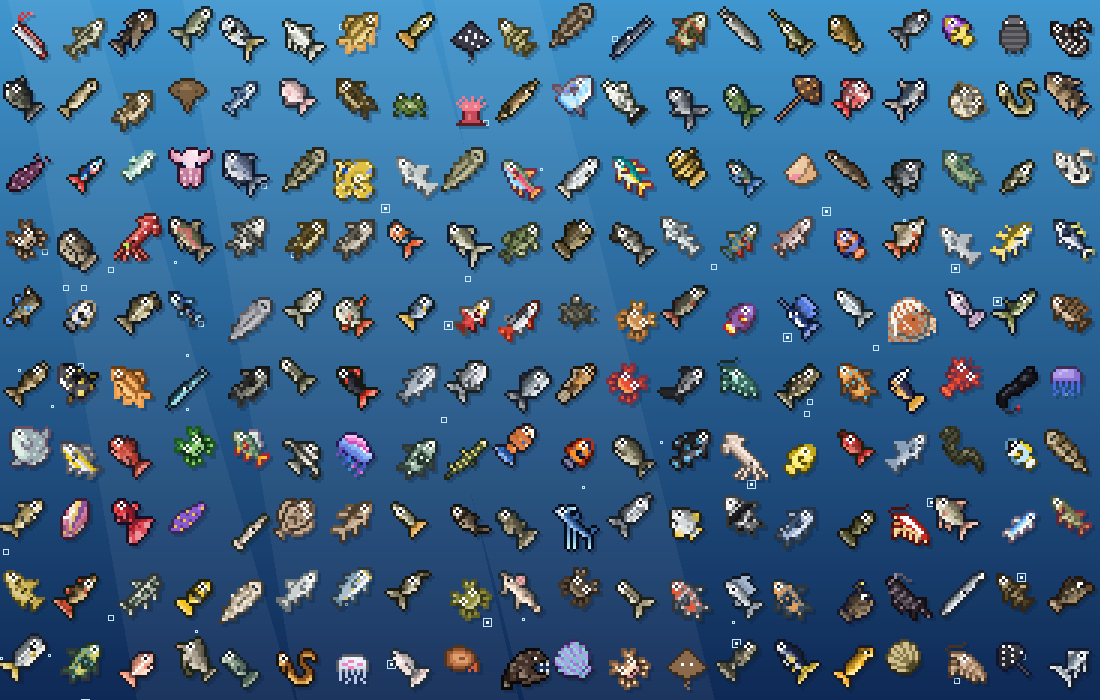
Gillbound v0.3 has more fish than an aquarium store's clearance sale: over 1,000 species to find, from real trout and tangs to things that crawled out of a lava pool. Each real fish was checked against real-world version to make sure they looked correct. Mages have arrived and they don't need weapons, they need balls of fire. Shopkeepers finally learned what a "Buy Back" button is (and they don't like it). Your gear now wears out when you die, so maybe stop doing that. Houses in the frozen north collect snow and grow icicles, metal roofs glimmer in the sun, and horses no longer just pop out of existence: they fly like a wisp into your soul. Experience comes out of monsters as glowing green pixels, the game opens with a sign rising out of the sea while fish jump over it, and we squashed a respectable pile of bugs along the way. Happy fishing! Still no release date available and lots of work still needs to be done. We can't wait to launch something worth playing. Fish on!
Fish & Fishing
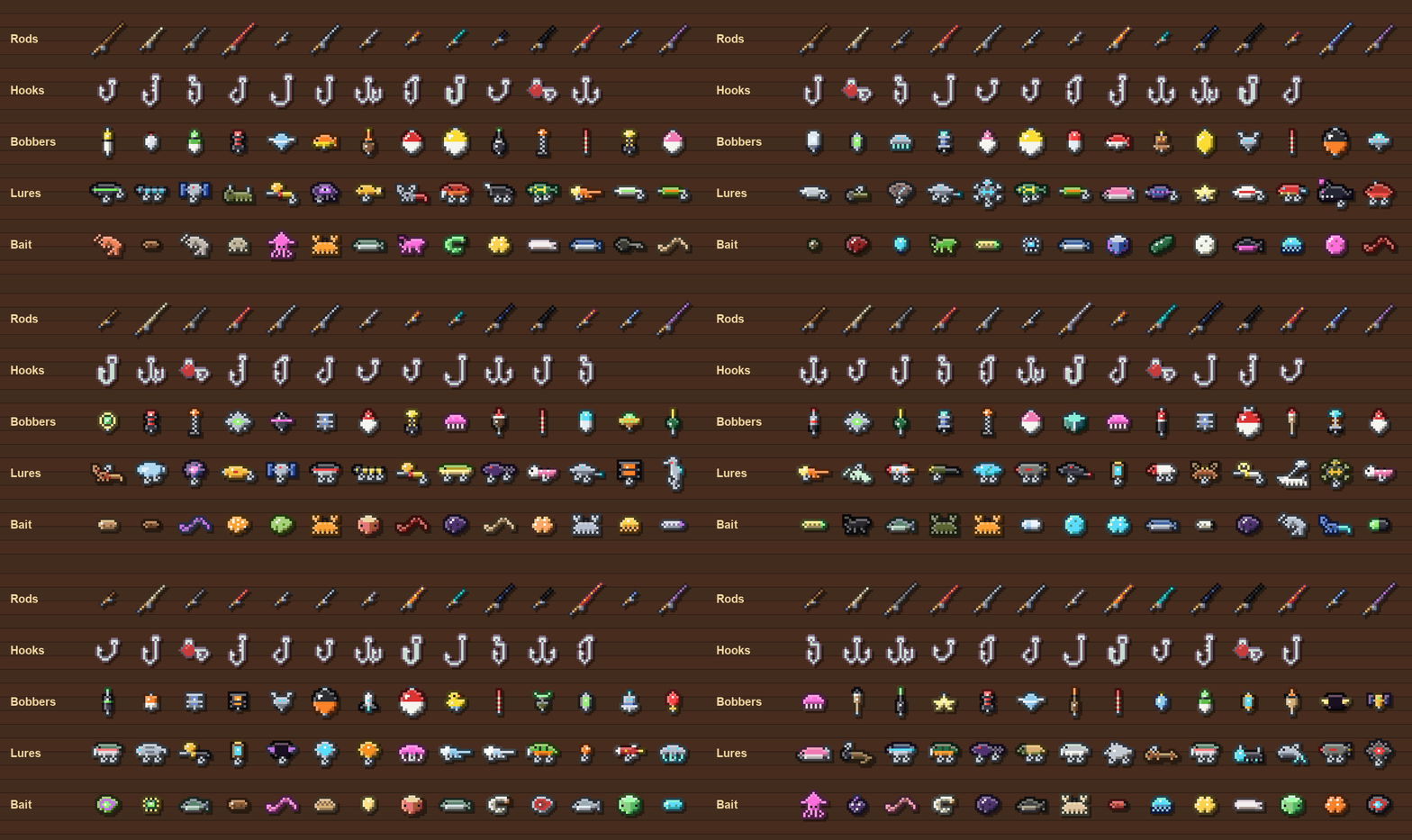
- New fishing art: hooks, bobbers, lures, rods in all 14 materials, and bait, each in a realistic and a sci-fi style.
- There will be over 1,000 fish to find: more than 800 realistic Earth-based fish and water creatures from oceans, lakes, rivers, jungles, swamps and frozen lakes, and more than 700 otherworldly fish from places like lava pools, toxic waste, moon pools and fungal pools.
- Hundreds of new fish and water critters, sorted by where they live: Beach, Brackish, Deep Sea, Diadromous, Frozen Lakes, Jungle, Lake, Mud, Ocean, River, Spring, Swamp and Tropical, plus 12 themed sci-fi groups (Lava, Toxic Waste, Moon Pool, Frozen Lakes and more). The 70 made-up Frozen Lakes fish sit with the sci-fi groups; the 5 real ones (Alaska Blackfish, Arctic Lamprey, Baikal Omul, Broad Whitefish, Golomyanka) stay with the real fish.
- 50 new real Frozen Lakes fish, all species from lakes that freeze over in winter: pikes, char and trout (Aurora Trout, Alpine Char, Siscowet, Lahontan Cutthroat), whitefish and ciscoes, graylings, Baikal sculpins and golomyanka, sturgeons, lampreys, Stonecat, Amur Sleeper and more, each drawn from photos of the real animal. The Frozen Lakes real-fish group goes from 5 to 55.
- New fish: the Redband Parrotfish. The Summer Flounder is gone, since it was the same fish as the Fluke.
- Fish that were drawn wrong now look like the real animals: 29 species redrawn first, then the Beach and Brackish fish checked one by one against photos and fixed.
- Ocean fish checked against real fish and fixed: new drawings of the Dover Sole, Scrawled Filefish, Cuttlefish, Lingcod, Manta Ray and Nassau Grouper, missing fins added to many others (Wahoo, Triggerfish, Spadefish, Sheepshead, Barracuda, Amberjack and more), and fins now blend smoothly into the body.
- Lake fish checked against real fish and fixed: new drawings of the Bluegill, Silver Redhorse, Goldeye, Arctic Grayling, Walleye, White Bass, Wels Catfish, Mudpuppy and Painted Turtle (now seen from the side), the right fins added across the lake (Redbelly Dace, Spottail Shiner, Tiger Muskie, Iowa Darter and more), and truer colours for the Bream, Kokanee and Zebra Mussel.
- River fish checked against real fish and fixed: the Arapaima's tail and back fins now form one solid red fan, the Longnose Gar has a proper needle snout, the Pacu is a round disc with an orange belly, the Peacock Bass has bold black bars and a tail eyespot, the Tigerfish is silver with dark lines and red fins, and the Asp, Dace, Rudd and Shorthead Redhorse got their true colours and the right fins.
- Diadromous fish checked against real fish and fixed: the Cutthroat Trout now has its red throat slash and red gill streak on an olive body, the Sockeye Salmon has its green head, the Atlantic Salmon is silver with black spots, the eels are olive, the three Kokopu have square tails with their fins set far back, the sturgeons have pointed snouts and shark-like tails, and the Ayu is slim and olive.
- Jungle fish checked against fish and fixed: the African Butterflyfish was redrawn with its rayed fan tail and wing-like fins, the Altum Angelfish has tall pointed fins and three dark bars, the Clown Loach has its three black bands, the Fire Peacock Cichlid is red with blue stripes, the Harlequin Rasbora has its black triangle, the Hatchetfish has its deep keel and marbling, the Bala Shark has black-tipped fins, the Clown Knifefish has its eyespots, and the Siamese Tiger Fish has wide dark bars
- Swamp animals checked against real fish and fixed: the Softshell Turtle is now drawn from the side with its flat pancake shell and long snout, the African Lungfish is olive-brown with dark spots, and the Spotted Salamander got more yellow spots and its fourth foot.
- Spring animals checked against real fish and fixed: the Blind Cave Tetra and Ozark Cavefish no longer have eyes, the Texas Blind Salamander was redrawn with its flat head, red feathery gills and long thin legs, the Spring Cavefish is a slim brown fish with a small eye, and the Kern Golden Trout has its dark parr marks.
- Mud animals checked against real fish and fixed: the Blind Cave Eel and Pale Olm are pale and eyeless (the olm now has its red gills and four little legs), the Striped Snakehead has long fins and a small rounded tail, the Banded Knifefish has its full-length fin running to a thin tail, the Bronze Corydoras glows green, orange and pink, and the Australian Lungfish's jaw is filled in.
- Tropical fish checked against real fish and fixed: the Betta has its long flowing red veil fins, the Copperband Butterflyfish is a tall white fish with black-edged copper bands, a long snout and a false eyespot, and 17 more got their missing markings (the Achilles Tang's orange tail spot, the Emperor Angelfish's yellow tail and eye mask, the Powder Blue Tang's black face and white tail, the Bluehead Wrasse's collar, the Clown Triggerfish's white belly spots and more).
- Every fish icon now fits in 16x16 pixels: 52 oversized icons (sturgeons, sharks, swordfish, squids and more) were trimmed by taking out repeated pixels, so they keep their look.
- Fish side fins blend into the body instead of having a dark border where they meet it.
The Mage & Combat
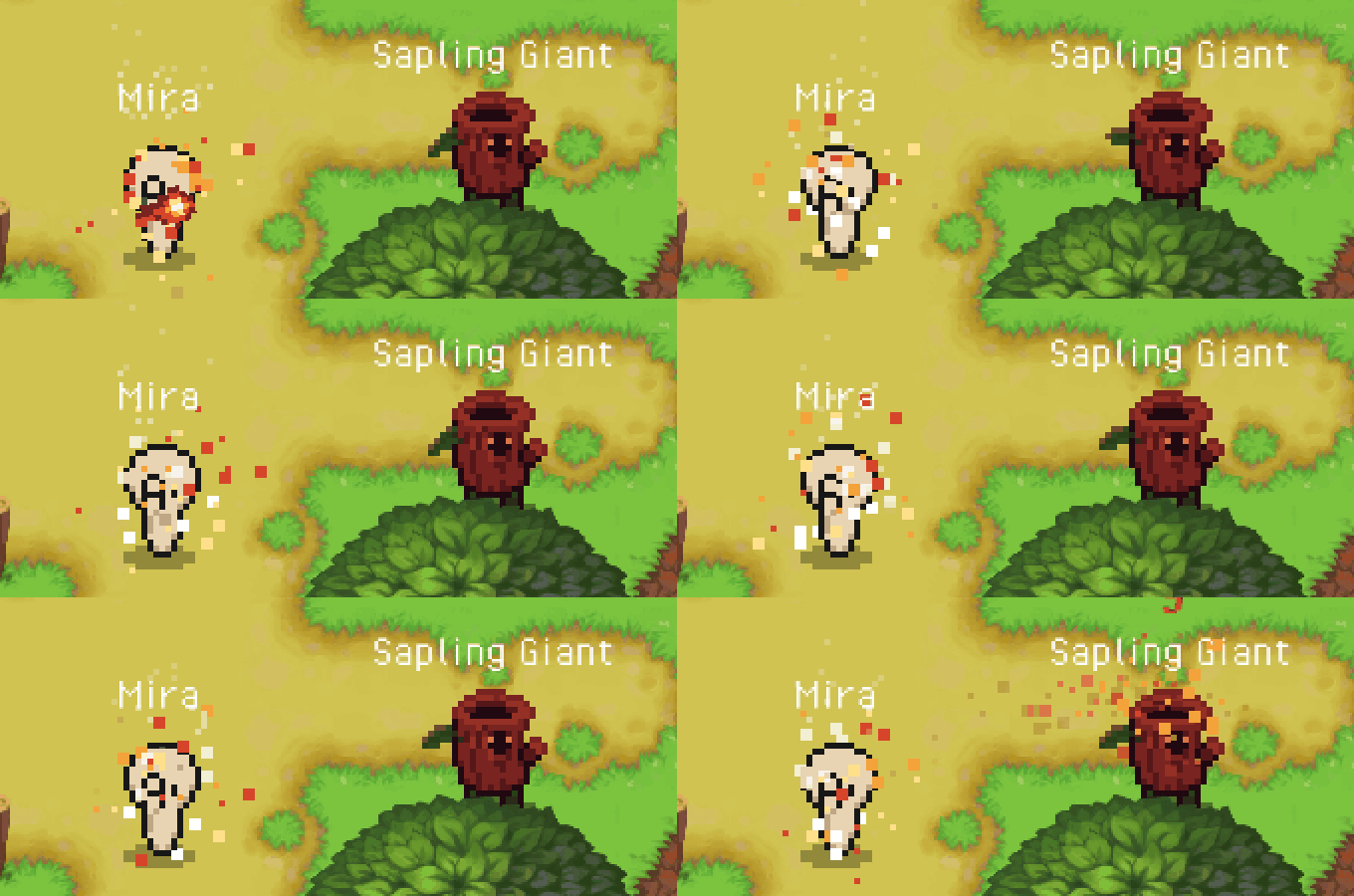
- New class: the Mage. Mages need no weapon: their normal attack is the Fireball, a bolt of fire that leaves a trail of flames and bursts where it lands (3 damage plus 4 fire damage). Mages wear cloth, have less health and defense, and more mana.
- Fire gathers in a Mage's hands while a Fireball is being cast.
- Attack speed comes from your weapon: each weapon has its own speed (seconds per normal attack). Its tooltip shows the speed on the damage line's right and its damage per second underneath. The website shows both too.
- Slow weapons wait between attacks: the swing, bow pull or punch now plays quickly in the last 0.6 seconds before the hit, instead of slowly across the whole attack.
- Unarmed fighting: with no weapon equipped, or a broken one, every class attacks with the new Unarmed Attack (its own punching animation, 2 seconds per attack, short reach) and can walk while fighting, like with a sword. The no-weapon warning no longer appears for normal attacks.
- Trying to attack 5 times without a weapon, or without the ammo your weapon needs (a bow without arrows), shows a popup explaining how to equip it, for every class. This no longer happens since we added unarmed fighting.
- Getting hit while casting a skill, crafting, enchanting or summoning sets it back 1 second (never past the start). Normal attacks aren't set back (website too).
- Attacking or casting a spell while riding now gets you off your mount by itself and starts the attack or spell, instead of telling you to dismount first.
- Instant casts show the cast bar full ("Instant") instead of empty.
- Charging a spell, enchanting and summoning gather their pixel effects into the character's hands instead of the head.
- After dying and respawning, you no longer start attacking the monster you were fighting by yourself, even if you respawn right next to it: target it and attack again.
- Dying no longer costs experience. The only penalty is the durability your gear and bags lose.
- Monsters that were after you forget you when you respawn, so they no longer die when you respawn in town
Monsters & Experience
- New experience formula: a monster gives 50 + 10 per level. Monsters above you give up to 30% more (3% per level, 10 levels for the full 30%); monsters below you give less, and nothing at 7 or more levels below.
- Parties that share experience get 25% more from every kill for each member nearby, up to 125% more with a full party of 5.
- Some monsters can give extra experience on top of the usual amount, the same at any level (none if you're 7 or more levels above them;).
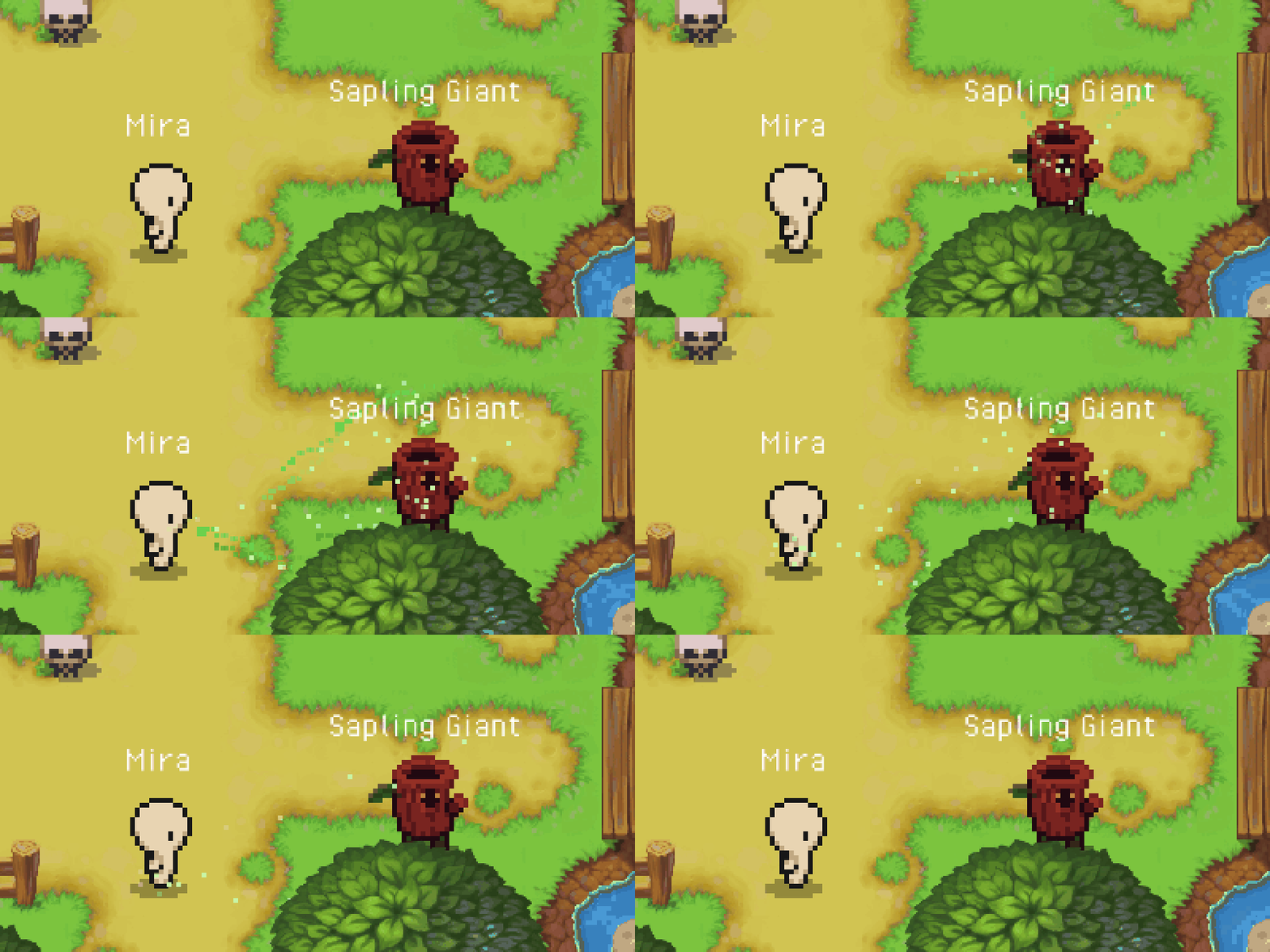
- Defeating a monster says how much experience you got in chat, in yellow, and green pixels shoot out of it and curve over to every player who got experience (one small pixel per 10, a bigger one per 100), leaving a light green trail that floats down and fades
- The green experience pixels from a kill leave a thin line behind them that fades as they fly to you.
- A monster you target is red with a skull in place of its level when it's 10 or more levels above you, and grey (name and level) when it's 7 or more levels below you.
- Monsters 10 or more levels above you chase you 1 faster than your own speed (not counting speed buffs like Windwalk), and their hits stun you at least 1 in 4 times.
- Monsters 10 or more levels above you attack 20% faster while fighting you, and go for the lowest level player in a group first (unless someone hits them).
- The experience bar is divided into 20 equal parts by thin lines, so you can see at a glance how far along you are (5% each).
- Archers level on a new experience curve: level 2 takes 200 experience, the last level 1,000,000.
- The selected target's name is a little bigger and shows its level, with the number in bold: "Sapling (27)". The name lines up with the close button, and targets that have mana show it in a blue bar right under their health.
- The target frame sits 2 pixels below the top of the screen like your own health and mana, and its bars are lined up with yours (4 pixels inside the frame).
- The target window stretches to fit a long name.
- The level number next to your portrait is a little bigger.
- The minimap no longer shows monsters frozen at their starting spots.
Pets & Mounts
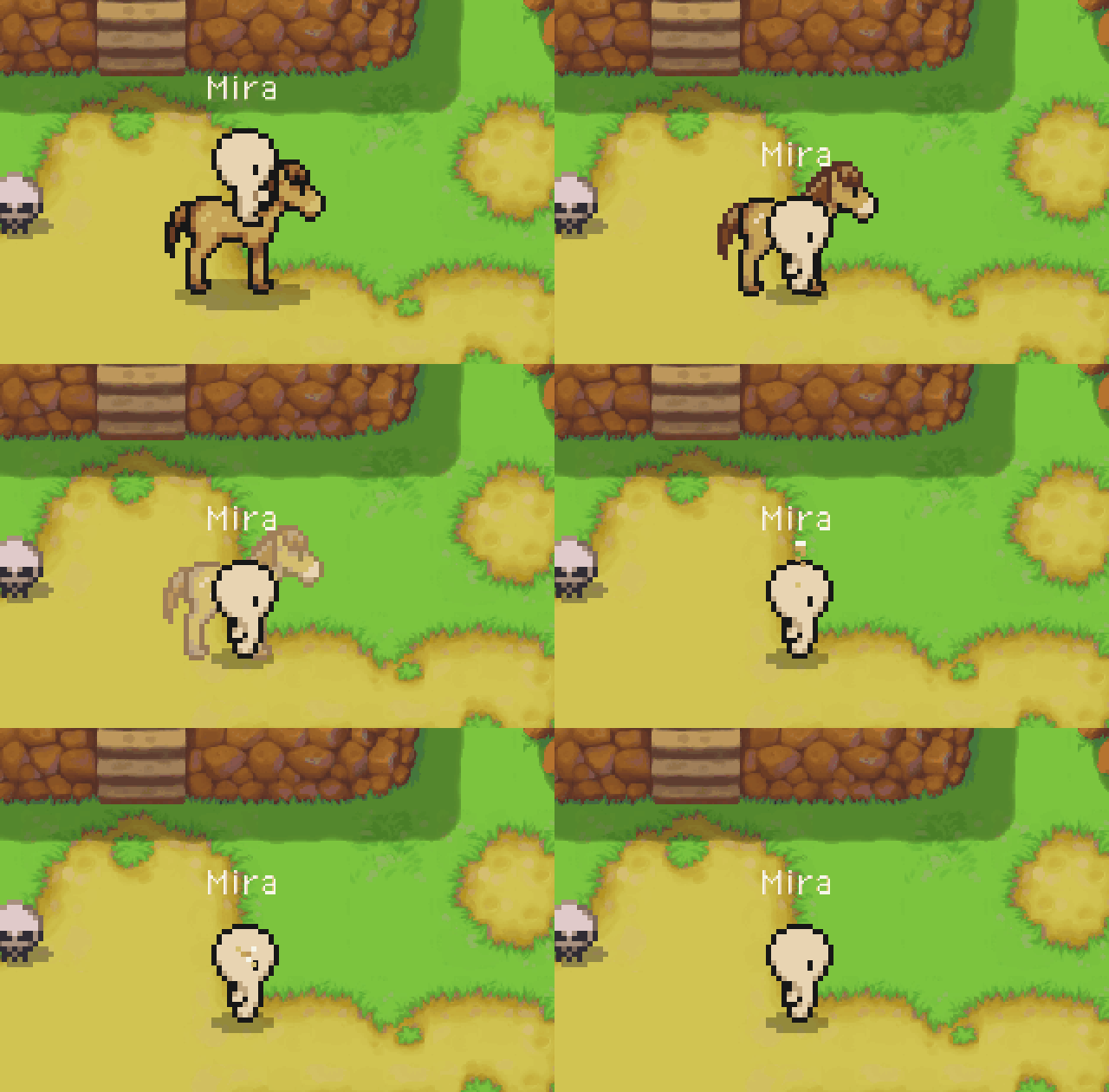
- Horses are always sent away with the wisp: the horse shines up and fades, and a wisp flies back to you.
- New unsummon style, Matrix: each column of the pet or mount vanishes from its top down, the columns at different moments, its pixels streaming up in green with fading trails like a Matrix screen.
- New unsummon style Sparkler: the mount loses random pixels, more and more, each shooting off in a random direction as a bright twinkling spark that arcs down and falls for about a second and a half (test button 8).
- Sparkler unsummon: the sparks last half a second longer, fall faster and bounce off the ground, landing in an ellipse around the mount.
- The sink effect gives off more pixels that rise higher, and throws up dirt in the ground's own colours at different angles, which falls and bounces a little.
- Sink unsummon: the dirt it throws flies in every direction and lands spread over an oval around the spot, not on one flat line.
- Fixed the sink, dissolve and border dissolve effects in the game: they read the wrong pixels from the packed sprite sheet, so pixels flew off in empty grass and the horse vanished in chunks. Sink now gives off three times as many pixels, straight up from where the art meets the ground. The wisp's shine and fade are smooth instead of stepping. The game icon fish now faces the other way.
- Mounts kick up dirt now and then as they run: darker than the ground so you can see it, in a few shades, some bigger pixels, spreading out to the sides and fading within a second.
- While riding, your name and bars no longer bob up and down with the mount, and the rider bobs at a calmer pace (once per stride instead of twice).
- Summoning a pet or mount shows the same pose as enchanting.
- The Wild Horse takes 3 seconds to summon again.
- The chat's text box frame is now just a dark outline and a brown ring (no yellow).
Houses & Buildings
- Houses are solid: you can't walk through their walls, only a little way into the doorway. You can walk behind them, and when your character is hidden behind one, a window around you turns the house see-through so you can see yourself.
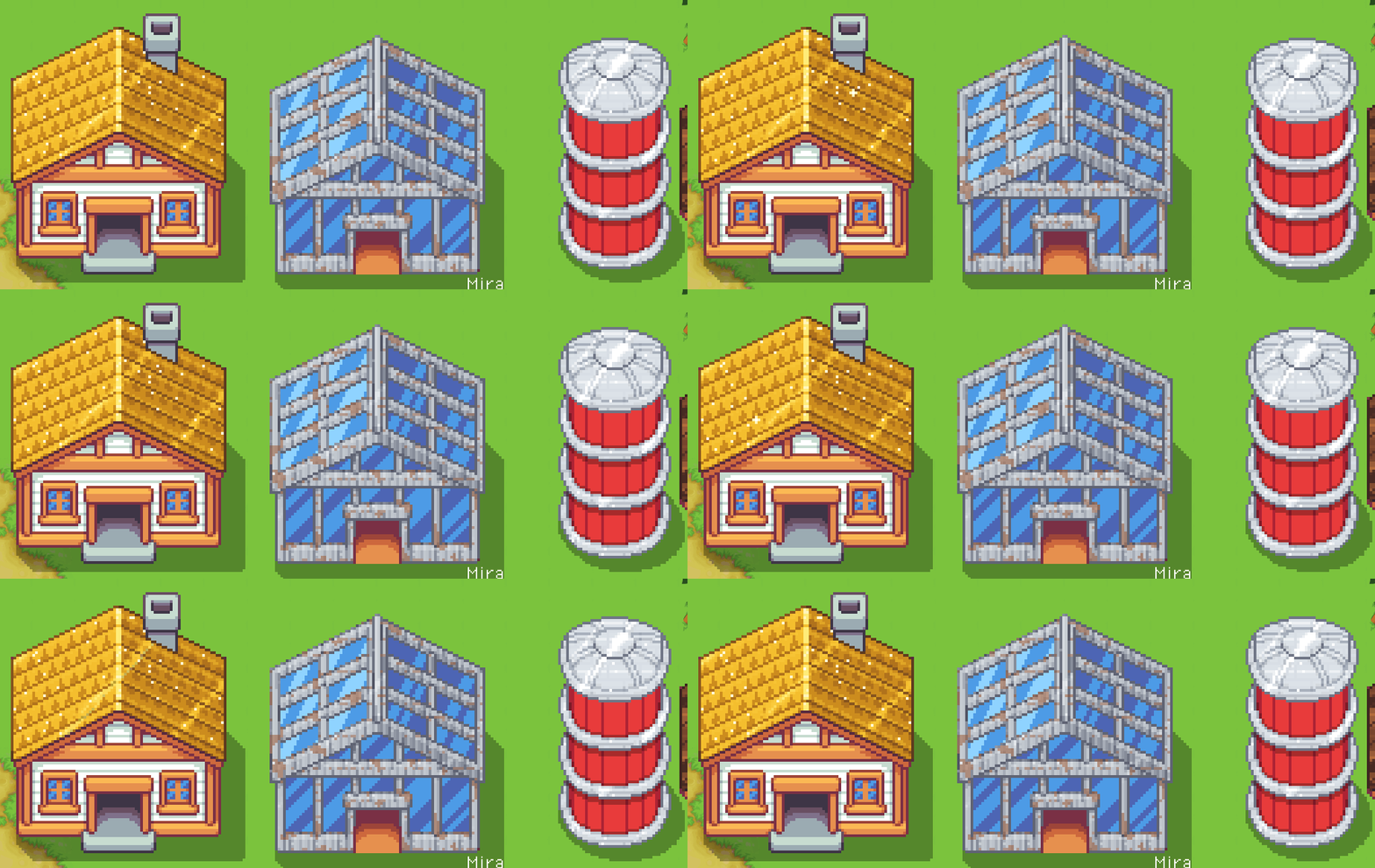
- Houses with metal and gem roofs glimmer: streaks of light, twinkles, stars, glowing motes or drifting waves, depending on the roof.
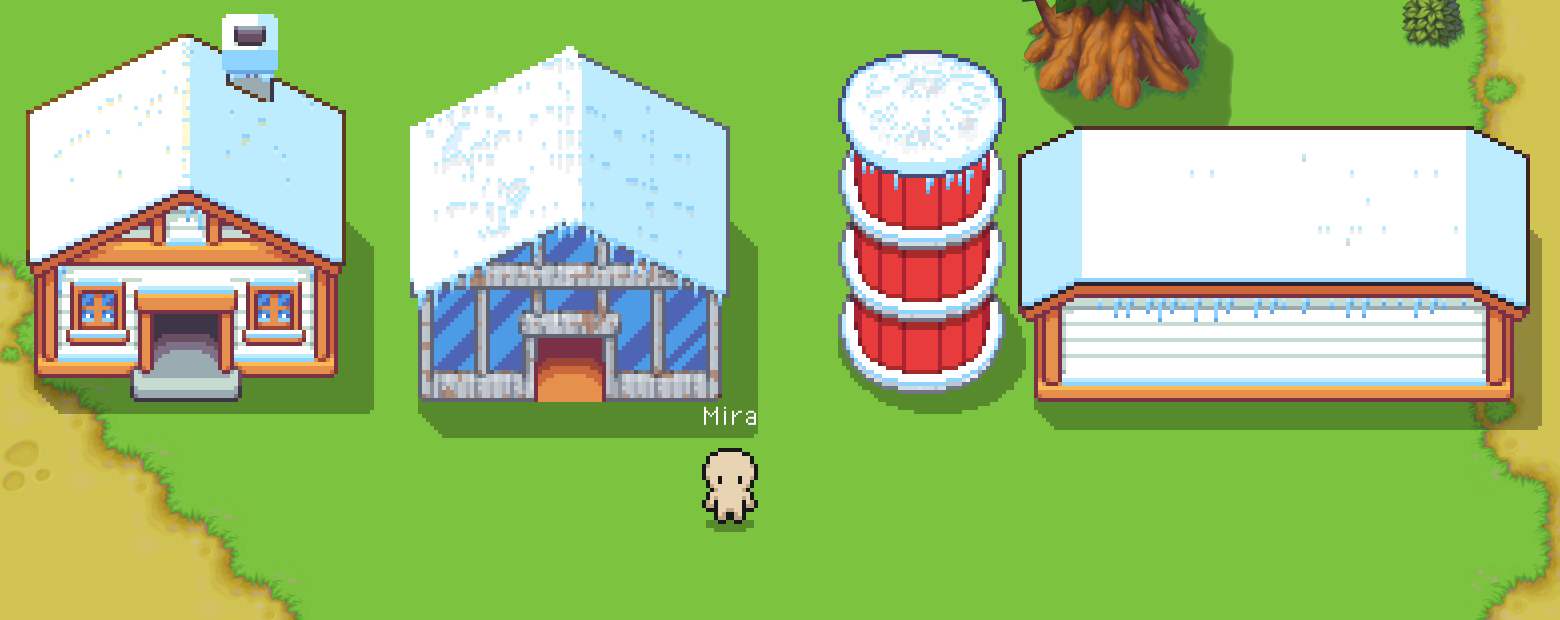
- In frozen areas, snow builds up on house roofs: first in the grooves of the roof and along its lower edges, with thinner see-through snow gathering round them in soft patches, then over the rest, until the roof is under a thick white layer. It shifts a little each day.
- As the snow on a roof builds up, icicles grow from the trim under the roof, more and longer the more snow there is.
- Snow also settles evenly on a house's flat ledges: the tops of door and window frames, the window sills and boxes, the beams across the walls and the wood along the bottom of the house.
- Icicles now also hang along the straight, flat stretches of trim under a roof, not only under the sloped edges.
- Snow on roofs looks cleaner: straighter edges between snow patches, no stray white strips or notches, and lighter edges where one part of a roof meets the snow of a lower part.
- House roofs now come all the way down to the wooden trim.
- Towns with lots of houses load in smoothly: roofs are prepared in the background, and each house appears once its roof is ready.
- Houses and barns cast a shadow to the south east: an even band along their bottom and right side, wider for taller buildings. It doesn't get darker where it overlaps your own shadow or another building's.
- Shadows no longer get darker where they overlap: standing in a tree's shadow, or a building's shadow falling across one, now looks like one even shadow. Character, creature and building shadows are now the same shade as the tree shadows.
- New buildings: 10 storage units, from small sheds to large warehouses, with white walls, wooden trim and red roofs like the houses. They take roof materials and dyes, gather snow and icicles, and cast shadows like the other buildings.
- New buildings: 10 greenhouses, from a small glasshouse to large ones with side wings, with wooden frames and glass roofs. Their frames take roof materials, with the same sparkles and shine as house roofs (the doors stay wood), and in frozen zones their roofs fill up with snow.
- New buildings: silos, from short ones with a single ring to tall, wide ones. Their silver cap and rings take roof materials with the same sparkles and shine as house roofs, and their red body can be dyed like barn walls.
- In frozen zones, a silo's cap fills with snow, snow settles evenly along the tops of its rings, and icicles hang from the cap's rim.
- Greenhouses also grow icicles along the edges of their snowy roofs.
- Round buildings like silos cast a rounded shadow instead of a straight-edged one.
Shops & Trading
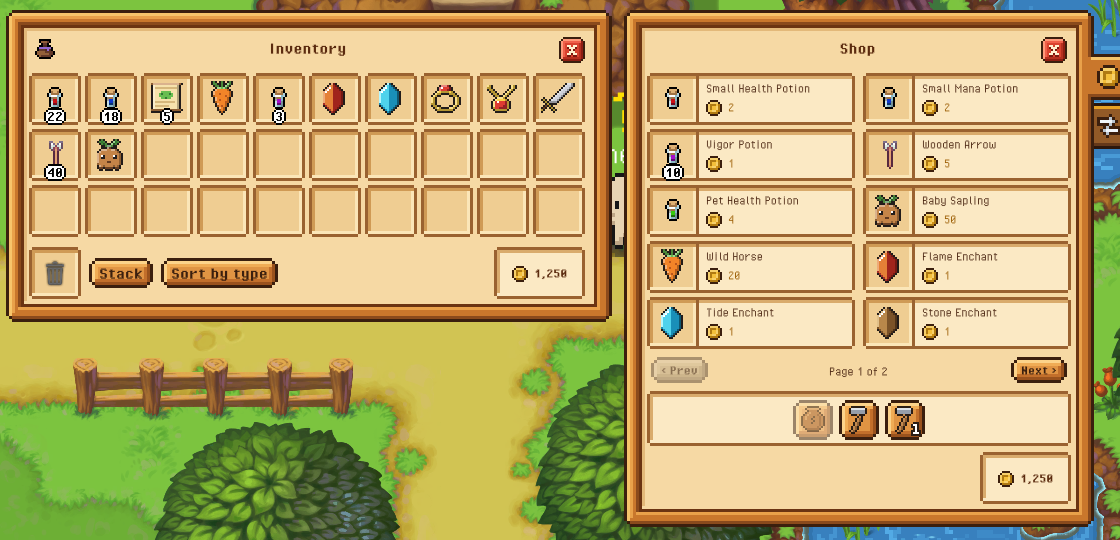
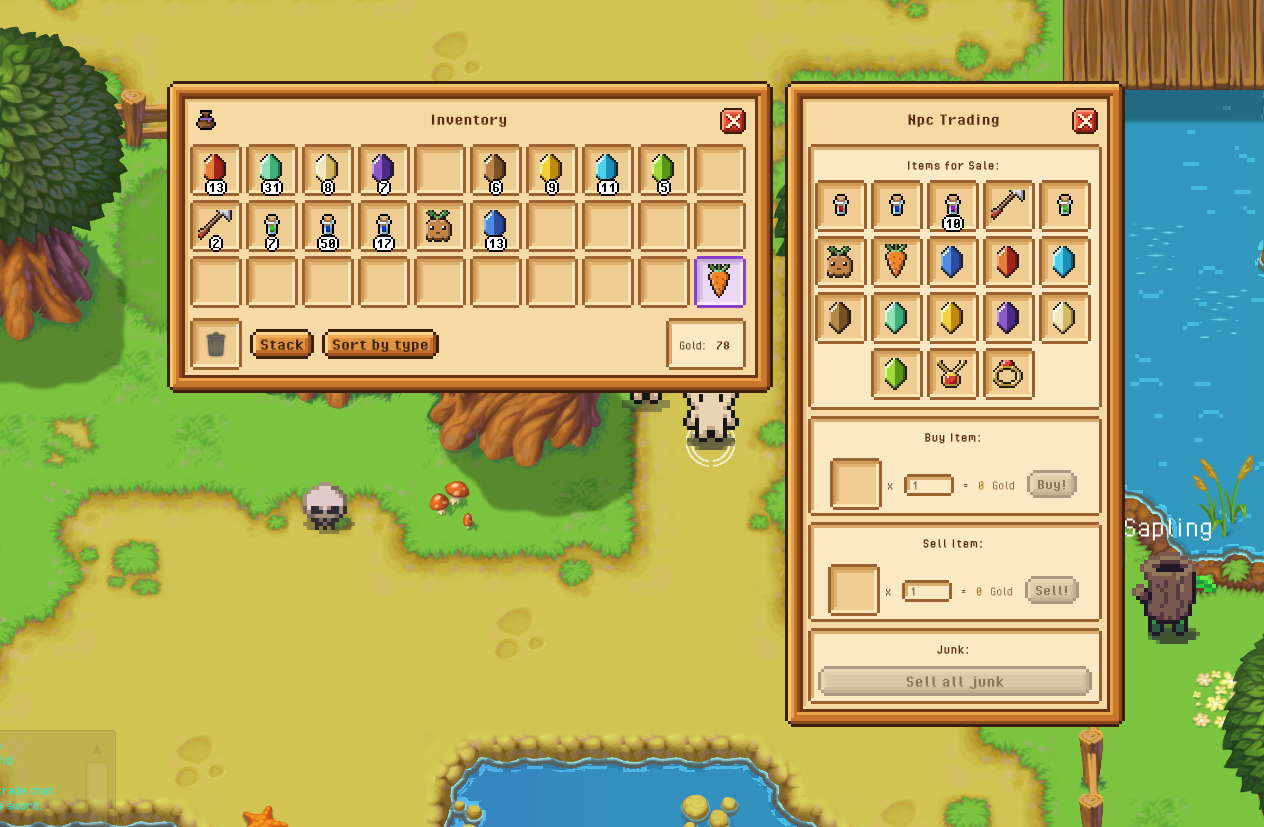
- Shops have tabs on the right of their window: Shop and Buy Back. Buy Back lists the last 12 items you sold to that shop; right-click one to buy it back for what you got for it. It's forgotten 2 minutes after you close the shop's window, or when you log out.
- Shop items are listed as rows with their name and price next to them, a page at a time, and the shop window shows your gold.
- Buying and selling work like in other MMOs: right-click a shop item to buy it (Shift: how many), or click it and then a bag slot to buy it there; right-click an item in your bags to sell it; or drag items between the shop and your bags. The Buy and Sell boxes are gone.
- Shop items sit in slots the same size as your bags', so they look the same, and the shop window is bigger to fit them. It keeps the same height on every page.
- Shops with many items show 10 at a time, with Prev and Next page buttons.
- Talking to an NPC who only buys and sells opens the shop (and your bags) right away.
- Shops have square service buttons: Sell All Junk and Repair All. Not every shopkeeper offers every service.
- Shops that repair have a single repair button: click it and your cursor becomes its icon, then left-click any item in your bags or character window to repair just that one (for its own repair cost). Right-click to stop. Required levels only show when your character is under them (bold red, under the description), and a weapon or armor type your class can't use shows in bold red. Broken gear's red slot is lighter.
- Buying from a shop makes the item's row flash green, fading away over half a second.
- Shops show items you can't use (another class's gear, or too high a level) in light red.
- Trying to sell something a shop won't take (like your starter weapon) now shows a popup saying so.
- Selling to a shop says so in chat ("You sold [Item] for 5 gold."), with a link to the item, and buying back links it too.
- With a shop open, item tooltips show the sell price at the bottom of the stats instead of hiding it under Hold V. Items shops refuse say "NPC does not buy this".
- Clicking a shop item and then an empty slot in your bags now buys it into that slot (it only worked on slots with an item).
- Right-clicking to put back a shop item you're holding no longer also buys (or sells) the item under the mouse.
- Empty Buy Back rows no longer show an empty tooltip.
- The shop window stays the same size when you switch between its tabs.
- New art for the shop's tabs: the chosen tab joins the window's frame, the other sits behind it.
- The shop's service buttons sit one pixel lower, so they look centred.
- Fixed the price of an item you sold showing through on the shop's first item while the Buy Back tab was closed.
- The shop's item list no longer has the "Items for Sale" box and title around it.
- The shop window's title shows the open tab (Shop or Buy Back), the Buy Back list lost its box and title too, and the item slots have the same gap on the left as above and below.
- The Guardian no longer repairs gear; the Alchemist still does.
- Shop rows are slimmer: the item's slot sits right on the row's border, so there's no double border.
- The gold box in the shop looks like the one in your bags, and both have the same space around the coin and amount on every side.
- Shop item slots and the trash slot light up when you point at them, like bag slots.
- For testing: the Alchemist sells the Sun Sword and Sun Bow, both priced at 1 gold.
Durability & Repairs
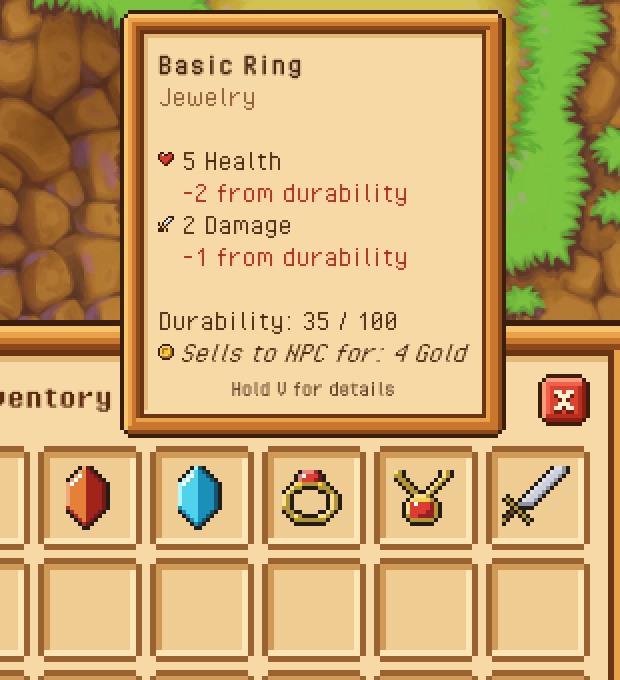
- Weapons, armor and jewelry have durability (100 points, shown in their tooltip). Each death takes 10 points off everything you're wearing and 2 off everything in your bags. A shop's Repair button fixes all your gear: a completely worn-out piece costs 15% of its price to repair, a partly worn one less (at least 1 gold).
- Worn weapons hit softer: a weapon's own damage drops with its durability, down to half when it's worn out ("10 Damage -5 from durability"). Enchantments keep their full bonus.
- Worn armor and jewelry give less too: all of an item's own stats (health, mana, defense, chances, elemental bonuses) drop with its durability, down to half when worn out, shown in red in the tooltip. Enchantments keep their full bonus.
- Broken gear (0 durability) gives nothing at all, enchantment included, until it's repaired; worn gear still loses its own stats gradually, down to half just before it breaks. Repairs cost less: a tenth of the price for a fully worn piece (at least 1 gold).
- Gear with no durability left has a light red slot. Worn gear sells for less: half its price when worn out, in between when partly worn.
- Elemental damage is worked out after a worn weapon's damage loss and rounds up, so even a tiny share still adds 1.
- Repairing (or wear) now updates durability in your character window and bags right away.
- New setting: Auto repair. When it's on, opening the shop of a vendor who offers repairs repairs all your gear right away (if you have the gold).
- With the single repair tool held, hovering an item shows only its name, durability and repair cost. Shop items' tooltips no longer end with buying instructions.
- Every durability penalty in item tooltips sits on its own row under its stat, lined up with the number, like the bow's.
Items, Enchants & Elements
- Elemental enchants can go on any equipment except ammo: on a weapon they add their element's damage, on armor and jewelry +10% defense against that element.
- Elemental damage is exact over time: the fraction a hit can't deal (health is whole points) is carried to the next hit, so 10% of 11 deals 1.1 per hit on average instead of rounding up to 2. Tooltips and the character window show the exact decimals (website too).
- Damage per second (character window and its tooltip) includes elemental damage: each element gets its own line ("Earth (10%): +2"), counted in Per hit and Per second. Weapon tooltips list their elemental damage with the damage, above damage per second, and count it in it (website too).
- Element affinity: a defense at the maximum (75%) shows in dark green in the character window, and its tooltip says "Maximum reached". The defense and damage icons under the column sit under the numbers' ones digit.
- The Sharpness Enchant is gone: sharpness will come from sharpening stones instead. Weapons that had it lose that enchantment, and any Sharpness Enchants in bags are removed.
- Dragging an enchant onto a stack of arrows (or anything else it can't enchant) in your bags now just swaps them, instead of saying it can't be enchanted.
- Arrows add +1 damage to your bow (other ammo can add more), shown on the arrow and in green on your equipped bow's tooltip. Ammo only counts with a weapon that uses it. The arrow's tooltip now shows all its details and its price.
- Each class has lists of what it can equip: weapon kinds, armor kinds (shields too) and materials (new on equipment: Fabric, Leather, Wood, Bone, Copper, Iron, Steel, Silver, Gold, shown before the kind, like "Iron Sword"). Warriors use swords and any armor with shields; Archers use bows and any armor. The wiki's class pages show a "Can equip" box.
- Gear your class can't use says so: "Sword (not for Archers)", and trying to equip it shows a "Can't equip" popup ("Archers can't equip Sun Sword.").
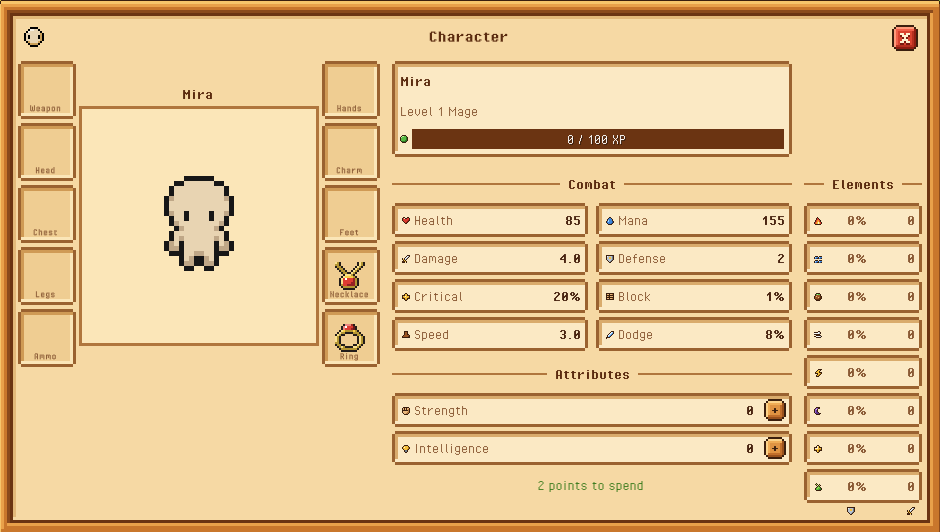
- The Shoulders equipment slot is gone (chest armor already covers the shoulders). Hands moved up into its place, and a new Charm slot sits below it.
- New charm necklaces and charm rings in every material, from wood to the rarest metals.
- New item type: Crafting Material, for base materials like wood and stone used to craft other things (it replaces the unused Crafting type).
- The Sun Sword, Sun Bow, Sun Ring and Sun Necklace are now called Basic Sword, Basic Bow, Basic Ring and Basic Necklace, and the Arrow is now the Wooden Arrow. Ones you already have are renamed too (website too; old wiki links still work).
- "Soulbound" is purple in tooltips.
- Elemental enchant tooltips show what they give on weapons and on other gear on two separate lines.
- The water enchant's ripple now spreads on the ground under your character instead of over them.
- Enchant crystals no longer say a piece holds one enchantment; broken gear's tooltip no longer has the extra Broken line.
- Weapon tooltips: elemental damage reads "+10% Poison Damage" in dark green, lined up with the damage rows (no icon); an elemental enchant's purple line has its element's icon.
Tooltips
- Hovering a stat in the character window shows what it's made of: your level, each piece of gear (and what wear takes off), enchantments, ammo, Strength/Intelligence, passive skills and buffs, then the total. Damage also lists the elemental damage each hit adds, and each element's row shows where its defense and damage come from.
- The character window's Damage is now damage per second: one normal attack's hit (your damage plus the attack's own) divided by your weapon's seconds per attack. Its tooltip shows the hit, the speed and the per-second total, and the elemental damage per hit and per second.
- Weapon tooltips show the damage on its own row with the speed beside it; the damage lost to wear and the ammo's bonus each get a row below it. Tooltips no longer shift some rows down a pixel when V shows the details.
- Weapon tooltips: the durability, ammo and damage per second rows under the damage line start where its number does.
- Statistic tooltips show their total (and damage per second) in the normal font: green when above 0, plain otherwise.
- Stat tooltip totals are dark green when above 0.
- Item tooltips show the required level (once you've reached it) and the item's level with the details, while V is held (website tooltips too).
- Item tooltips list how many fit in one bag slot ("Stacks to: 50", with the stack icon) among the details shown while V is held, for everything except equipment, ammo included (website too).
- Item descriptions moved into the hidden details (hold V), in italics, right under "Hold V for details". Shopkeepers say they don't want items worth 0 gold to them. Popups, questions and notices (like the shutdown countdown) now show above tooltips.
- "Sells to NPC for" moved into the hidden details (hold V), as their last line. Worn gear's lower sell price no longer comes with a red note.
- Item tooltips no longer show a "Price" line; "Sells to NPC for" stays.
- Item tooltips no longer have a "Sellable" line: "Sells to NPC for" (or "NPC does not buy this") already says it. Gone from the website's item cards and item pages too.
- Potion tooltips show how much they restore in green. Tooltip stat icons are drawn at their real 8x8 size (no longer stretched), centred on their line, in the game and on the website.
- Potion tooltips show the heart or mana icon in front of "Restores 20 Mana" lines.
- New 8x8 icons for cast time, range, stun chance and how long something lasts, in game and website tooltips. Bonus lines ("Gives +1% Critical chance") show their stat's icon, and what a skill heals is listed under "Gives" on the website.
- The defense and damage icons under the character window's element column sit centred under their numbers. Element tooltips no longer show the defense cap.
Chat & Interface
- Item links in chat: items show as [Name] in their rarity colour. Click one to open its tooltip, click it again or the X to close it. Buying from a shop links the item in chat. While typing, Shift + left click an item in your bags or character window to link it (only items you really have can be linked).
- Item links in chat: linking the same item more than once gives a link for each, each underlined and opened on its own. A linked item's tooltip shows whether it's soulbound.
- Chat: only a player's name opens a whisper reply, so item links in their messages can be clicked. An item link's tooltip keeps its details under "Hold V for details". The chat's text box no longer stretches when you type a lot.
- Chat: item links and names are underlined while hovered.
- Chat item link tooltips show above open windows (bags, shop, character) instead of behind them.
- Fixed: moving the mouse straight from one chat link to the next kept the first one underlined.
- Fixed: some item links (an enchanted Sun Bow, any weapon at full durability) made the whole chat message disappear, and pressing Enter sent links as plain text.
- The chat's text box has the same wooden pixel frame as the buttons (still dark inside). Item links in speech bubbles show just the item's name, without brackets.
- Chat text is 2 pixels bigger. Items worth 0 gold to vendors can't be sold to them.
- The most recently opened or clicked window is drawn in front; Settings, notifications and questions always stay on top.
- Popups: the same message isn't added again (trying to sell a refused item over and over), and long popups scroll so the Ok button stays on screen.
- Gold shows its coin on the left of the amount everywhere (bags, shops, loot, trading, mail), lined up with the numbers.
- Item slots have a thinner shadow along the top and left edge.
- The server shutdown countdown now sits below the target frame instead of covering it.
Website & Admin
- Admins can restart the game servers from the website (in 30 minutes or now): they shut down with the usual countdown and start again by themselves.
- Website: item tooltips follow the game's order: when it binds, its stats or effects, durability and level, then the description (in italics) and the details.
- Website: enchant cards show what an enchant does the way the game does, one purple row each ("On weapons: +4 fire damage.", "On other gear: +10% fire defense.").
- Website: skill tooltips show what the skill gives first, then its numbers.
- Website: class tooltips have icons for Max level and Skills, and the stat and element tiles' icons sit level with their text (centred on the capital letters).
- Website: the Item Types page lists each type and what it is, without the Items column (a type's tag still opens its items).
- Website: the 8x8 stat icons are always 8x8 (never stretched) and centred on their line, on every page.
- Tooltips no longer show a required level of 1 or less, in the game and on the website.
- Fixed (website): a character's stats card showed elemental damage as a percent, and an elemental enchant on armor or jewelry gave its damage number as defense. It now shows "+4" damage and the enchant's real defense ("+10%"), like the game.
- Website: a character's card says when a worn item is broken (it gives nothing then, its enchantment included).

Splash Screen
- The game opens with a new splash screen: the wooden Gillbound sign rises out of rippling water and lifts into the air, fish leap out from behind it and dive back in with a splash, and water drips off the sign's letters into the water below.
Fixes & Behind the Scenes
- Fixed logging in getting stuck on "Handshake..." (and progress not saving) when a save got stuck in the database: servers no longer hold each other's saves up.
- Buffs keep counting down while you're logged out: one with 2 minutes left is gone if you were away longer than that.
Version 0.2
Combat & Skills
- Keep moving while attacking: you keep attacking whenever the enemy is in reach, pause when you step out of reach, and carry on when you’re back. This lasts until it dies, you pick another target or you press Esc.
- Archers: they now stand still to shoot and fire once per second. Walking stops the shooting, and it carries on when you stop near the enemy. Sword attacks still let you walk around.
- New: Instants. These skills have no cast time and can be used while moving: Windwalk, Focus and Hard Shell. A ring spreads out on the ground in the spell’s colours, and you keep facing the way you walk.
- Casting effects: casting spells, crafting and enchanting show pixels gathering around you. They take the colours of the spell’s element, your weapon’s enchant or the enchant you’re applying. White sparks also rise from your feet.
- Cast bar: it’s now a pixel art bar sitting just above the action bar.
- Moving cancels: moving cancels a cast, an enchant or crafting, and nothing is used up.
- No snap-backs: walking while a cast starts no longer pulls you back several steps.
- Missing weapon: attacking without the right weapon, or a bow without arrows, says what’s missing in chat. After five tries, a popup explains how to equip one.
- Respawning: you come back with 10% of your health (was 50%).
PvP
- PvP flags: players can only fight each other when both have PvP on. Use the PvP button left of your portrait.
- Turning it on asks first.
- Turning it off is instant, unless you fought a player in the last 20 minutes.
- Players with PvP on have red names, and party members can’t fight each other.
- PvP areas: they turn PvP on for everyone inside, 20 seconds after you walk in.
- A popup at the top counts down until then, and closes if you leave.
- There’s a small test zone in the north-west of the island.
- Level / combat window: a small window left of your portrait shows your level, and crossed swords while you’re in combat.
- Statuses removed: Offender and Murderer are gone.
Monsters & Looting
- Chasing: monsters keep chasing you as long as you keep hitting them. They only go home once nobody has hit them, and they’ve hit nobody, for a while.
- Looted gold in chat: in a party it shows the total and your share.
- Corpses:
- A corpse’s name turns grey once it’s empty, and the body disappears 6 seconds later.
- Bodies with loot stay 60 seconds (a boss’s 5 minutes), and until a party’s loot roll is over.
- Loot rolls: they last up to 2 minutes; whoever hasn’t picked by then passes.
- Ctrl+click on a far-away corpse: it now loots everything once you get there.
Items, Enchanting & Soulbound
- Some items bind to you when picked up or when equipped, and enchanting an item binds it.
- Bound items can’t be traded or put in guild storage.
- The game asks first, and the tooltip shows “Soulbound”, “Binds when picked up” or “Binds when equipped”.
- Enchant by dragging: drop an enchant onto equipment, either in your bags or worn. You’re asked first, and warned before an enchantment is replaced.
- It takes 6 seconds, with a cast bar, and you stand still for it.
- New elemental enchants: Tide, Stone, Gale, Storm, Shadow, Radiant and Venom, each +10% of its element’s damage. The Alchemist sells every enchant (1 gold each while we test).
- Element enchants in attacks: a weapon’s element enchant colours its sword swings and arrow trails.
- Enchant effects: each enchant plays its own effect on success, which players nearby see too.
- Enchant item type: enchants have their own type, Enchantment, and can need a level to use.
- Sun Sword and Sun Bow: they can’t be traded, sold or stored in guild storage.
Bags & Equipment
- Double-click gear in your bags to equip it; what you wore goes into your bags.
- Double-click gear in the character window to take it off.
- Potions still work with one click.
- Splitting stacks: Shift + click a stack to split it.
- Stack and Sort: Stack only fills up stacks, and Sort always sorts properly, even when clicked quickly.
- Drop highlight: while dragging, the slot under the item lights up when you can drop it there.
- Locked pets and mounts: a locked pet or mount item stays purple while it’s out.
- Crafting with worn items: drag a worn item into the crafting window to use it.
Pets & Mounts
- Summoning: calling a pet or mount takes 3 seconds of casting, and walking cancels it. Sending it away is instant.
- Dirt: mounts kick up pixels of dirt in the colour of the ground they run on.
- Riding: no skills, crafting or enchanting while riding; dismount first.
- Ground ring: the ring when a mount appears or goes away is drawn under the characters.
Shops & Trading
- Shop layout: shops open beside your bags, side by side in the middle of the screen.
- Double-click a shop item to buy one right away. Keep clicking to buy more: one item for every two clicks.
- Chat confirms every purchase.
- Sell slot: drag an item back out of it, or type 0 as the amount, to take it out.
- Limited stock: some shop items have limited stock that comes back over time. The Alchemist sells Vigor Potions (up to 10 in stock).
Interface & Tooltips
- Item details: hold V over an item to see its Price, Destroyable, Sellable and Tradable lines.
- No Amount line: item tooltips no longer show it, since the slot already shows the number.
- Required Level: shows in red when your level is too low.
- Stat icons: tooltips show small stat icons in front of their lines.
- Enchant tooltips: they show the effect in purple.
- Action bar tooltips: they’re left-aligned, without upgrade requirements.
- Logged out: being logged out closes all open windows.
- Maintenance: logging in while the servers are down says Gillbound is down for maintenance.
- Performance numbers: the numbers above the chat start hidden; press O to show them.
Settings
- Layout: dropdowns are at the top and check boxes below; hover over a setting to see what it does.
- Resolution and UI size: both ask whether to keep the change, and go back after 10 seconds if you don’t answer.
- Auto Potions: health and mana are now sliders.
- PvP popups: a new check box turns off PvP warnings, and asks first.
- Always on top: the Settings window always shows above other windows.
Website & Wiki
- New pages: Terms of Service and Privacy Policy. Sign-up requires accepting them, and you’re asked again whenever either changes.
- Account names are private.
- New accounts are approved by hand for now.
- Logging in keeps you logged in for 30 days.
- Search: wiki search is on every page and finds game mechanics and item categories.
- Phones: the top menu folds into a button.
- Your characters’ stat cards show stat icons.
- The Email news switch saves right away.
- The Items page starts with its categories.
- Enchant pages say what they do.
- Mount and pet pages show the time to summon.
- Item pages show how an item binds.
- Changelog: 20 versions per page.
Version 0.1
I am introducing Gillbound.com, a fishing based MMORPG. We at Ocho Kocho Pocho Corp. really hope you enjoy this game as much as we enjoy making it :)
There is no fishing yet and we are not accepting users just yet but we do have a grand system in place to handle thousands of players in one world at a time.
Expect to own land, grow crops, have mining machines, multiple professions, giant boats manned by multiple players, advanced marketplace, stock market and many more features!
This game is inspired by a few different games including Zelda - A Link To The Past, World of Warcraft, and Stardew Valley / Harvest Moon.
We are currently running the game world on 14 cores, expanding and contracting as players join alongside you. I wonder when they day will come that we will need more cores :)
Major changes
- A base map has been designed for testing purposes.
- Animated water: waves, ripples and shore foam, and colour shading for grass and water.
- A huge-world system: the map is stored in chunks that stream in as you move, so the world can grow far and wide.
- Dungeons with a private copy for each party (up to 5 players), a dungeon graveyard and exits back outside the entrance.
- A minimap, a full world map, and maps on the website wiki.
- Two classes, Warrior and Archer, each with its own skills, stats and level curve.
- New 48×48 character art with a shared base body, a riding pose and soft shadows under everyone.
- Ranged combat that respects the world: arrows stop at tree trunks and fly over cliffs.
- Smarter monsters: they call nearby monsters for help, give up the chase when led too far, and respawn.
- Eight elements (fire, water, earth, wind, electric, dark, holy, poison) for damage and defense on gear, potions and monsters.
- Dodge, block and critical hits, a level-up effect, and a Character window with all your stats.
- Smooth movement that catches up after lag, attacking while you walk, and deaths that land at the same moment for everyone.
- Pixel-art item icons, item types (weapon, armor, potion, junk...) and rarity colours in tooltips.
- Weapon and armor types, and two-handed weapons like the Basic Bow that can’t be held with a shield.
- Enchanting: one enchantment per piece of gear (Sharpness, Flame), with a question before one is replaced.
- Potions that restore health and mana or give buffs, which can’t be wasted at full health or mana.
- Auto potions that drink by themselves below the health or mana percentage you choose, saving Vigor Potions for when both are low.
- Bag tools: Stack and Sort buttons, grey junk with a Sell all junk button, and item locking (Ctrl+click) against moving, selling or trading by accident.
- Fair loot: the first hitter owns it, parties take turns and split the gold, and rare items are rolled with Need/Greed/Pass.
- Loot won with full bags waits next to inventory for 7 days. Only two extra slots available.
- Loot All, Ctrl+click looting and an Auto loot setting.
- Pets and mounts with summon and unsummon effects; defeated pets can be revived at the Alchemist.
- Parties of up to 5, guilds with a guild bank, and invites that work across the whole world.
- Zone, trade, party, guild and whisper chat that reaches across servers, with emojis, chat bubbles and a profanity filter.
- Mail between players with gold and attachments (10 gold per letter); unopened gold returns to its sender.
- Trading you can walk during, saved safely so items and gold can’t be lost or duplicated.
- Protection against exploits: guild bank duplication, hopping between world copies, and logging out to escape a fight.
- A gateway that sends every player to the right game server, so the world can grow across many servers and machines.
- Busy places split into shards automatically, and players move between servers without noticing.
- Each account plays one character at a time: logging in elsewhere safely logs the old session out first.
- Up to 2,000 connections per server, tested with crowds of bots. Realistically more around 800 real users per server, 6,000 per cluster, with multiple clusters planned.
- One same account for the game and the website, with secure passwords, “remember me” and encrypted connections.
- Play in your browser or download the Windows game, which updates itself.
- Fair warnings: a 2-minute countdown before an outdated game updates, a 30-minute countdown before a server shutdown, and logout after 30 idle minutes.
- A pixel-art interface with a crisp pixel font, an adjustable UI size, and settings for fullscreen, VSync, auto loot and auto potions.
- gillbound.com with a full wiki of every class, skill, item, monster, NPC, quest, pet, mount and dungeon, plus hover cards.
- A Game Mechanics guide, an island map showing where everything is, and this changelog.
- An account page listing your characters, with their stats and gear on hover, and an email news switch.
- An admin panel with a dashboard, gold economy tracking, error log, server and machine monitoring, bans, deleted-character restore, game settings, a server shutdown button and the changelog editor.
- Saving in the background, a database on its own server, automatic reconnects, and a one-command deploy script.